
Configure a Shared Træfik Gateway on K3s
Træfik Gateway API on K3s: Shared Gateway, TLS and Helm caveats.
Ingress NGINX Controller for Kubernetes is retired on March 2026 and Kubernetes Ingress API will receive no future development. Configure Traefik as a shared Gateway in K3s ↗.
The Kubernetes Ingress API ↗ is feature-frozen and will not developed any further. New traffic management capabilities are being developed in the Kubernetes Gateway API ↗, which provides a more expressive and extensible model for service networking, but is still lacking the feature parity with the Ingress API. As stated in Kubernetes official documentation:
“The Kubernetes project recommends using Gateway ↗ instead of Ingress ↗. The Ingress API has been frozen. This means that:
- The Ingress API is generally available, and is subject to the stability guarantees ↗ for generally available APIs. The Kubernetes project has no plans to remove Ingress from Kubernetes.
- The Ingress API is no longer being developed, and will have no further changes or updates made to it.”
In the meantime, the ingress-nginx ↗ project (Ingress NGINX Controller for Kubernetes) retires on March 2026 ↗, forcing half of the Kubernetes universe racing against time to migrate to a viable alternative.
Ingress and Gateway APIs can coexist in the same cluster. Migration does not need to be immediate or global. Many environments adopt Gateway API incrementally by introducing shared Gateways for new workloads while continuing to run existing services behind Ingress.
Using a shared Gateway has several advantages. It allows a single, centrally managed entry point to serve multiple applications, reduces duplication of configuration, and limits the permissions required by application teams. Applications only need to create route resources in their own namespaces, while certificates, listeners, and exposure policies remain under the control of the Gateway owner.
Gateway API Components#
The Gateway API defines a set of resources that separate infrastructure concerns from application routing concerns. Each resource (4 stable at the time of writing) has a clear responsibility and scope:
GatewayClass#
A GatewayClass represents a type of Gateway implementation (exactly as the IngressClass for the Ingress API). It is defined by the infrastructure or platform layer and is typically installed by a Gateway controller (for example, Traefik, Envoy Gateway, Kong and many others ↗).
Application teams do not interact with
GatewayClassdirectly.
Gateway#
A Gateway represents a network entry point into the cluster. It defines where and how traffic enters the system (per cluster if shared or per application if dedicated).
Gateways are usually managed by platform or infrastructure teams and are often shared across multiple applications and namespaces.
Routes#
Routes define application-level routing to backend services and attach to a Gateway. HTTPRoute is the most common route type and is used for good ole’ HTTP and HTTPS traffic. GRPCRoute on the other hand, defines gRPC-specific rules for routing traffic from a Gateway to backend network endpoints.
Routes are typically created and managed by application teams in their own namespaces.
Configure K3s Helm Charts Manifests#
K3s ↗, in its default configuration, comes pre-configured with Traefik and this where we are going to focus on. Traefik Gateway CRDs are installed but no GatewayClass or Gateway are enabled or deployed. K3s is bootstrapped with a Traefik Ingress.
K3s uses a built-in mechanism to deploy and manage core cluster components using Helm charts. This mechanism is implemented through two custom resources: HelmChart and HelmChartConfig. Together, they allow K3s to install, configure, and upgrade packaged applications during cluster startup and runtime.
This system is primarily used to bootstrap components such as Traefik, CoreDNS, metrics-server, and other optional add-ons. The presence of a HelmChart resource signals the K3s Helm controller to install or upgrade the corresponding Helm release and a HelmChartConfig resource provides user-defined overrides for a corresponding HelmChart. K3s supports placing manifests under:
/var/lib/rancher/k3s/server/manifests/This mechanism allows cluster configuration and enables automatic upfront bootstrapping and (re)configuration without the need of manual Helm commands. To configure Traefik, we need to update the traefik-config.yaml as following:
- Enable the
kubernetesGatewayunderproviders. - Add a new stanza
gateway.listeners. We need to add two listeners, one for HTTP and one HTTPS traffic and point them to the internal ports of the Traefik container, namely8000and8443respectively. - Each listener should explicitly set
namespacePolicy.fromtoAll. Without this configuration, the value defaults toSame, restricting Gateway access to workloads within the same namespace only. - For the HTTPS listener set
modetoTerminate. With this knob TLS connections are terminated at the Gateway. TLS handling is centralized at the Gateway and like this we avoid the need for individual applications to manage certificates or serve HTTPS themselves. - When using
protocol: HTTPSwithmode: Terminate, the Gateway must reference at least one TLS certificate. Without a certificate, the Gateway controller cannot program the listener. Certificates are referenced using the stanzacertificateRefs, which point to KubernetesSecretobjects of typekubernetes.io/tls. TheSecretmust exist in the same namespace as theGateway, contain a valid certificate and private key and of course match the hostnames served by the listener.
In a shared Gateway setup, certificate management is typically handled by the platform or infrastructure layer.
apiVersion: helm.cattle.io/v1
kind: HelmChartConfig
metadata:
  name: traefik
  namespace: kube-system
spec:
  valuesContent: |-
    providers:
      kubernetesIngress:
        enabled: true
      kubernetesGateway:
        enabled: true
    gateway:
      listeners:
        web:
          port: 8000
          protocol: HTTP
          namespacePolicy:
            from: All
        websecure:
          port: 8443
          protocol: HTTPS
          mode: Terminate
          certificateRefs:
            - kind: Secret
              name: wildcard-cert-tls
          namespacePolicy:
from: AllCreate the wildcard-cert-tls (see next paragraph) and then restart the K3s service to pick up the changes. It should provision a GatewayClass and a Gateway in namespace kube-system.
sudo systemctl restart k3sAssuming you are running a Debian-family operating system; otherwise, adjust the command above accordingly.
Create a Wildcard Certificate#
A wildcard certificate allows a single certificate to cover multiple hostnames under the same domain. For example, a certificate for *.apps.mylab.home can be used for serving multiple applications e.g.:
whoami.apps.mylab.homegrafana.apps.mylab.home- any other subdomain under
apps.mylab.home
This is useful in shared Gateway deployments, where multiple applications attach routes to the same HTTPS listener.
Let’s lay the create a wildcard certificate for our private published services
1️⃣ Create a file wildcard.cnf and paste the following:
[req]
default_bits       = 4096
prompt             = no
default_md         = sha256
distinguished_name = dn
x509_extensions    = v3_req

[dn]
CN = apps.mylab.home

[v3_req]
subjectAltName = @alt_names
keyUsage = digitalSignature, keyEncipherment
extendedKeyUsage = serverAuth

[alt_names]
DNS.1 = apps.mylab.home
DNS.2 = *.apps.mylab.homeReplace
CN,DNS.1andDNS.2with the values specific to your environment.
2️⃣ Create the Certificate
openssl req -x509 -nodes -days 825 \
  -newkey rsa:4096 \
  -keyout tls.key \
  -out tls.crt \
-config wildcard.cnf3️⃣ Create the Kubernetes Secret
kubectl -n kube-system create secret tls wildcard-cert-tls \
  --cert=tls.crt \
--key=tls.key4️⃣ Create DNS Records
You have to make sure that the external IPs that are assigned to your Gateway/Ingress (the node IPs in case of a vanilla K3s) are pointing, with or without a floating IP, to *.apps.mylab.home. Adjust your DNS records accordingly.
Once both Gateway and Secret are configured, the Gateway can serve HTTPS for any route whose hostname matches the certificate.
If on the other hand you are planning to expose services to the public, TLS certificates should be issued by a publicly trusted certificate authority (like Let’s Encrypt for instance). In Kubernetes environments, this is commonly handled using cert-manager ↗ with a DNS-based ACME challenge (DNS-01 ↗). DNS validation is required for wildcard certificates and/or for clusters that are not directly reachable over HTTP. In this setup, cert-manager is responsible for obtaining and renewing the certificate, while the resulting TLS
Secretis referenced by the Gateway listener. The DNS provider configuration (DNS solver) must be able to create and remove validation records for the target domain. This approach allows certificate management to remain automated and independent of application routing configuration.
Create a Workload#
We are going to test the whole setting now with deploying and exposing traefik/whoami ↗ internally.
1️⃣ Create and deploy the manifests for the application itself
apiVersion: v1
kind: Namespace
metadata:
  name: whoami
---
apiVersion: apps/v1
kind: Deployment
metadata:
  name: whoami
  namespace: whoami
spec:
  replicas: 3
  selector:
    matchLabels:
      app: whoami
  template:
    metadata:
      labels:
        app: whoami
    spec:
      containers:
        - name: whoami
          image: traefik/whoami:v1.11
          ports:
            - name: http
              containerPort: 80
---
apiVersion: v1
kind: Service
metadata:
  name: whoami
  namespace: whoami
spec:
  selector:
    app: whoami
  ports:
    - name: http
      port: 80
targetPort: http2️⃣ Create and deploy the manifests for the Route
apiVersion: gateway.networking.k8s.io/v1
kind: HTTPRoute
metadata:
  name: whoami
  namespace: whoami
spec:
  parentRefs:
    - name: traefik-gateway
      namespace: kube-system
  hostnames:
    - whoami.apps.mylab.home
  rules:
    - matches:
        - path:
            type: PathPrefix
            value: /
      backendRefs:
        - name: whoami
          port: 80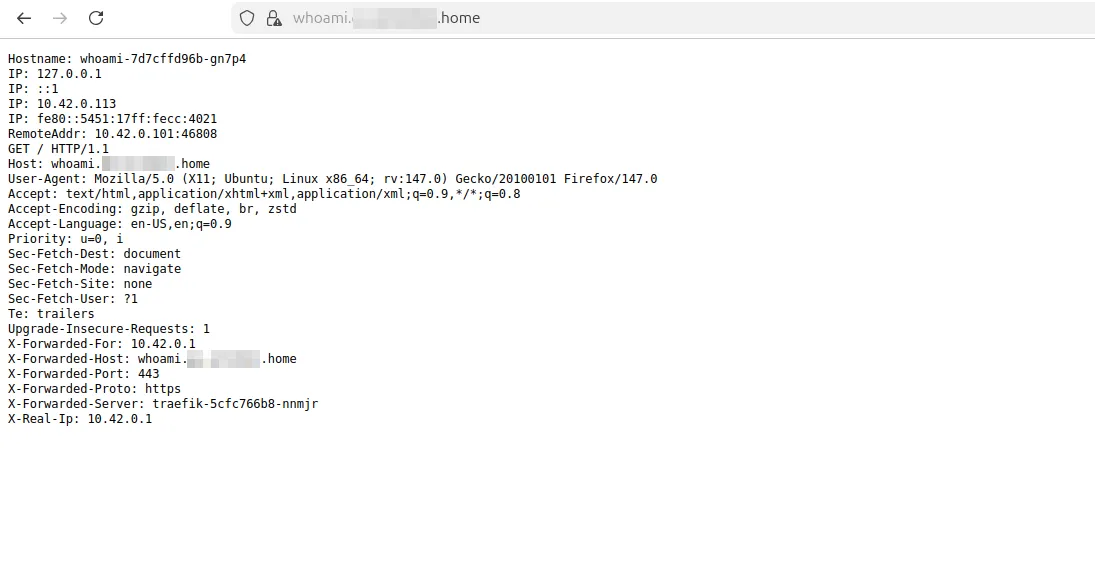
Of course the Certificate is not trusted as it is a self-signed one.
Closing Thoughts#
Retiring kubernetes/ingress-nginx ↗ sets a genuinely bad precedent for the ecosystem because it shows that even foundational “it’s everywhere” components can become unsustainable and then get shut down without a fully community-owned succession plan.
There isn’t a single definitive estimate of the blast radius of this event, but the Kubernetes Steering Committee itself in a statement calls it “the piece of critical infrastructure for about half of cloud native environments.”. You get the picture right?
So act now, before you need to (re)act under pressure after March 2026.
As long as Ingress API is getting no new features, sooner or later you’ll need considering moving to Gateway API (unless you have a strong technical reason to do otherewise).
⚠️ This article does not advocate replacing the Kubernetes Ingress NGINX Controller with Traefik Gateway. It simply explains how to configure a K3s cluster to use a shared Gateway, leaving the choice of controller to your specific needs.
Originally published on Medium ↗